How to Create Fires in Initium
A step-by-step guide to building campfires -- from breaking down wooden items for kindling to relighting the embers.
TL;DR
1. Experiment on any wooden item (club, spear, etc.) to discover "Break-down Wooden Items into Kindling"
2. Break down wooden items into kindling (need 4+ pieces)
3. Experiment on kindling to discover "Turn Kindling into Tinder" (needs 1 Firewood XP)
4. Convert 1 kindling into tinder
5. Get a fire starter — loot a Flint & Steel from orcs, or use a nearby lit fire
6. Discover "Create Fire" (no knowledge needed, just keep experimenting)
7. Switch to Experimental View (2D button), select a tile, use Create Fire with: 1 tinder + 3 kindling + 1 fire starter
8. Feed the fire — add kindling, wooden weapons, or logs before it burns out
There's something deeply satisfying about building a campfire in Initium. It's not just clicking a "Make Fire" button — you're gathering wooden items, breaking them down into kindling, processing that kindling into tinder, finding (or crafting) a fire starter, selecting the perfect spot, and finally coaxing a spark into flame. Then you need to keep it alive with fuel, or watch it slowly die back to cold ashes.
This guide walks you through the entire process from start to finish. Even if you've never used the Invention System before, you'll have a roaring campfire by the end.
Before You Begin
Fire creation uses Initium's Invention System. The Invention panel can be opened from any UI by clicking the Invention icon (or pressing X), so you can experiment, discover ideas, and prototype skills in both the Classic UI and the Experimental View.
However, for the actual fire creation step — where you place a Dug Firepit at a specific spot — you'll want to be in the Experimental View (the 2D grid map). The grid map lets you select the exact tile where your fire will be placed. To switch, click the "2D" button on the top banner. All the earlier steps (experimenting, learning skills, gathering materials) work fine in either UI.
If you want a deeper understanding of how experimentation, ideas, and prototyping work, check out our Mastering the Invention System guide. This guide will explain what you need as we go, but that one covers the full system in detail.
What You Need to Build a Fire
Creating a fire requires three specific materials and a learned skill. Here's the shopping list:

- 1 Tinder — fine fibrous material that catches a spark. You make it from kindling.
- 3 Kindling — small wood pieces that feed the initial flame. Break down any wooden item to get these.
- 1 Fire Starter — something that produces a spark. A Flint & Steel, a Crude Iron Flint, or even a nearby lit fire.
Plus you'll want extra fuel (more kindling, wooden weapons, or any flammable items) to keep the fire burning once it's lit. A fire without fuel goes out very quickly.
None of these materials come ready-made — you have to gather and process them yourself. Let's go through each one.
Step 1: Getting Kindling
Kindling

is the backbone of fire-making. You need at least 4 pieces (3 for the fire itself, plus 1 to convert into tinder), and having extra for fuel doesn't hurt either.
The easiest way to get kindling is to break down wooden items you already have — Wooden Clubs, Spears, Staffs, and other wood-class items that monsters commonly drop. The skill for this is called "Break-down Wooden Items into Kindling", and it has no knowledge requirements at all. Here's how to get it:
- Pick up any wooden item from your inventory or the ground (a Wooden Club from a monster drop works perfectly)
- Open the Invention panel and go to the Experimentation tab
- Experiment on the wooden item. After each experiment, the game rolls to see if you discover new ideas
- Since "Break-down Wooden Items into Kindling" has no knowledge requirements, it can appear from any experiment at all — you just need a lucky roll. Keep experimenting until it shows up in your Ideas tab
- Once you have the idea, prototype it to turn it into a usable skill
- Use the skill on your wooden items to break them into kindling
This is the fastest path to kindling because you don't need to learn tree cutting or find an axe — just experiment on junk wooden items you've picked up from combat. One wooden club breaks down into multiple pieces of kindling, and you'll likely have several wooden items lying around from fighting.
Want more kindling? If you need a larger supply — or want logs and branches for long-lasting fuel — you can also harvest kindling from Birch Trees using the tree cutting and log bucking skills. Check out our Tree Harvesting Guide for the full process. But for just getting a fire started, breaking down wooden items is all you need.
Step 2: Making Tinder
Kindling alone isn't enough to catch a spark — you need something finer. Tinder
is made by breaking down kindling into delicate, fibrous material that ignites easily.
The skill for this is called "Turn Kindling into Tinder", and here's how to get it:
- Experiment on kindling (or any Firewood-class item) to gain XP in the "Firewood" knowledge category
- After gaining 1 XP in Firewood, you become eligible to discover the idea
- Keep experimenting until it appears, then prototype it into a skill
- Use the skill: it takes 1 Kindling and produces 1 Tinder
As the skill description puts it: "The idea is to break apart the kindling until it is essentially large fibers that burn quickly and easily." Having a knife or cutting edge available as a tool makes the process faster, though you can do it bare-handed in a pinch.
This skill supports repeat execution, so if you need to process multiple pieces of kindling into tinder, you can queue them up rather than clicking one at a time.
Step 3: Getting a Fire Starter
A fire starter is the tool that creates the initial spark — without one, all the tinder and kindling in the world won't help you. You have three options, ranging from easy (if you've been fighting monsters) to self-sufficient (if you're a dedicated crafter).
Option A: Loot a Flint & Steel from Monsters

The Flint & Steel is the best fire starter in the game — it has high durability and lasts through many fire-starting attempts before wearing out. It drops from Orc enemies:
- Orc Footman — found in the Old Mine complex (Mine #2, #4, #5, #6, #8)
- Orc Scout — found in Aera Swamplands, North West Hills, Orc Outpost, Orc Camp
- Orc Guard — found in Orc Outpost, Old Mine #4, Orc Siege Camp
- Orc Miner — found in Old Mine #8, #10SW, Orc Camp
- Orc Archer — less common, but also carries them
If you've been exploring the Old Mine area or fighting orcs, there's a good chance you already have one of these in your inventory.
The Crude Iron Flint is a budget alternative — it works the same way but has much lower durability, so it wears out quickly. These drop from Brigands and Thieves along the High Road (Forest Lookout, Dense Forest, Lake area).
Option B: Craft Your Own Fire Starter
If you'd rather be self-sufficient, you can craft a Crude Iron Flint using the "Create a Crude Firestarter" skill. This requires:
- Materials: 1 Iron Ore Fragment + 1 Flint
Knowledge: 3 XP in Iron Ore

and 1 XP in Flint

to discover the idea
Where do you get Flint? There's a skill called "Break down flint firestarter" that extracts the flint chunk from an existing Flint & Steel. It requires 1 XP in the Flint category to discover. So the crafting path is: fight some orcs for a Flint & Steel, break it down to get the Flint component, then combine that flint with iron ore to make your own fire starters going forward.
Option C: Use a Nearby Lit Fire
Here's a tip many players miss: if there's already a lit fire
anywhere in your location, you can use it as your fire starter. When filling in the fire starter tool slot for the "Create Fire" or "Relight" skills, any active fires in the area will appear as options alongside your flint items.
Even better: using an existing fire as your starter is 10x faster than using a flint tool. So if someone else has already built a fire in camp, light yours from theirs. It saves time and saves your flint's durability for when you really need it — out in the wilderness where there's no fire to borrow from.
Step 4: Discovering the "Create Fire" Skill
With your materials gathered, you need the actual skill to put them together. The "Create Fire" idea is one of the most accessible in the game — it has no knowledge requirements whatsoever. Any experimentation on any item gives you a chance to discover it.
If you've been following this guide and experimenting on wooden items and kindling along the way, there's a solid chance you've already discovered it. If not, just keep experimenting on whatever items are handy. The idea will show up eventually — it's purely a matter of the random probability roll succeeding.
Once the idea appears in your Ideas tab:
- Click on it to see the prototype requirements
- Provide the required materials (tinder, kindling, and a fire starter — similar to the actual fire creation)
- Run the prototype
- On success, you get a "Create Fire" skill in your Skills tab
The prototype process consumes materials, so make sure you have enough tinder and kindling for both the prototype AND the actual fire creation. Break down a few extra wooden items to be safe.
Step 5: Building the Fire
This is the moment everything comes together. You have tinder, kindling, a fire starter, and the skill. Time to light up.
- Select a spot on the grid map where you want the fire. Click on an empty tile — this is where your firepit will be created. (If you're in the Experimental View, use the 2D grid map to pick the exact tile. Make sure you've switched to the grid map view for this step.)
- Open the Invention panel (press X or use the flask icon in the bottom bar)
- Go to the Skills tab
- Find and select your "Create Fire" skill
- Fill in the material and tool slots:
- Execute the skill and wait for the timer to complete
Fire Starter (tool slot) — select your Flint & Steel, Crude Iron Flint, or a nearby lit fire
Kindling — select 3 pieces
Tinder — select 1 piece from your inventory
When the skill finishes, a Dug Firepit appears at the spot you selected. Congratulations — you've just created a fire from scratch!
But don't celebrate too long — at this point, the fire is barely smoking. It has very little fuel and will go out within minutes if you don't add more. Think of it as a spark that's caught, but needs to be fed immediately.
Step 6: Fueling the Fire
A newborn fire is fragile. You need to feed it right away.
How to Add Fuel
- Look at the grid map and find your firepit. You may need to hit the refresh button if it's not showing the latest state.
- Click on the firepit to open its popup menu
- Click the "Add Fuel" option
- A fuel screen appears showing all compatible items from your inventory
- Select the items you want to throw on the fire and confirm
What Burns?
The fire accepts any item that has the Flammable aspect or belongs to the Firewood item class. In practice, this includes:
And here's a practical tip: wooden weapons dropped by monsters — Wooden Clubs, Spears, Staffs, and similar items — are also flammable. Instead of leaving monster loot on the ground, throw it on the fire. It's free fuel that you'd otherwise ignore.
Capacity and Burn Time
The firepit has a maximum fuel capacity — there's only so much you can pile on at once. When you're adding fuel, the interface shows you how much space is left. Larger items like logs take up more space but also burn for longer.
A fully loaded fire typically lasts a few hours of real time, much like a real campfire. The exact duration depends on what you've added — a fire packed with large logs will outlast one stuffed with kindling.
One quirk: you can slightly overfill the firepit if you add a large item that pushes past the capacity limit. The game lets you add that one last item even if it exceeds the maximum. So if you have one big log left and the fire is almost full, go ahead and throw it on.
Want better fuel? Logs and branches from felled trees burn much longer than kindling or wooden weapons. If you want to keep a fire burning for hours, check out our Tree Harvesting Guide to learn how to fell trees and harvest logs.
Step 7: Watching the Fire Burn (and Relighting It)
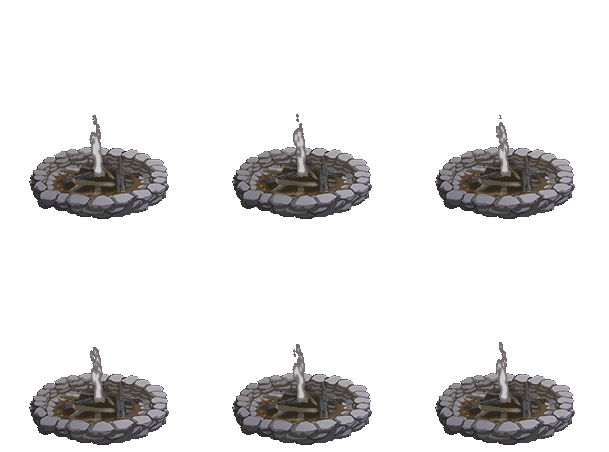
Fires in Initium aren't static. They progress through several visual stages as fuel is consumed:
- Lit — bright flames, full light radius. The fire has more than 45 minutes of fuel remaining.
- Heavy Smoke — the flames are dying down, more smoke than fire. Between 20 and 45 minutes remaining.
- Light Smoke — fading embers, barely glowing. Less than 20 minutes left.
- Gone Out — cold ashes. No light, no warmth.
You can add fuel at any time while the fire is still burning to extend its life. Just click on the firepit and use the "Add Fuel" option. You don't have to wait until it's about to go out — topping it off when you have extra materials is good practice.
When the Fire Goes Out
When your fire finally dies, don't worry — the firepit itself remains. You don't need to create a new one from scratch. Instead, clicking on the cold firepit gives you a "Light Fire" option.
Relighting works the same as the original creation: you provide 1 Tinder, 3 Kindling, and a fire starter. The materials get consumed, the fire relights in the existing pit, and you're back in business.
This is where having a second fire nearby really shines. If you've built two firepits and one goes out, you can relight it using the other fire as your fire starter — which is 10x faster than using a flint. In a camp with multiple fires, you can chain-relight them from each other and never wear out your Flint & Steel at all.
Quick Reference Tables
Materials Checklist
| Item | Qty | How to Get It |
|---|---|---|
| Tinder |
1 | Process Kindling with "Turn Kindling into Tinder" skill |
| Kindling |
4+ | Break down wooden items (clubs, spears, etc.) or harvest from trees |
| Fire Starter |
1 | Flint & Steel (orcs), Crude Iron Flint (brigands/craft), or a nearby lit fire |
 Fuel Fuel |
Lots | Wooden weapons, kindling, or logs/branches from trees — anything flammable |
Skills You Need
| Skill | XP Needed | What It Does |
|---|---|---|
| Break-down Wooden Items | None | Convert any wooden item into kindling |
| Turn Kindling into Tinder | Firewood: 1 | Convert 1 kindling into 1 tinder |
| Create Fire | None | Create a new Dug Firepit at a selected tile |
Tips from Experienced Firemakers
- Break down monster loot. Wooden Clubs, Spears, and Staffs from combat are perfect kindling material. Don't leave them on the ground — break them down or throw them directly on an existing fire as fuel.
- Preserve your Flint & Steel. It has limited durability. Every fire-start or relight costs a use. Whenever there's a nearby lit fire, use that instead — it's 10x faster and doesn't wear down your flint.
- Build two firepits. If you're setting up a camp, build two fires close together. When one goes out, relight it from the other one — faster, and saves your fire starter's durability.
- Fires aren't permanent. A fully fueled fire lasts a few hours, then goes out. Plan accordingly — you can always come back and relight it later when you need it.
- The firepit stays forever. Even after the fire goes out completely, the Dug Firepit remains on the map. You never need to dig a new one in the same spot — just relight the existing one with fresh materials.
- Want long-lasting fires? Logs from felled trees burn much longer than kindling. If you plan to keep a fire going for hours, check out the Tree Harvesting Guide to learn how to fell and process trees for premium fuel.